Analyze
This page explains how to use the data analyses functionalities in the usv-playpen GUI.
In order to run any of the functions detailed below, select an experimenter name from the dropdown menu and click the Analyze button on the GUI main display:
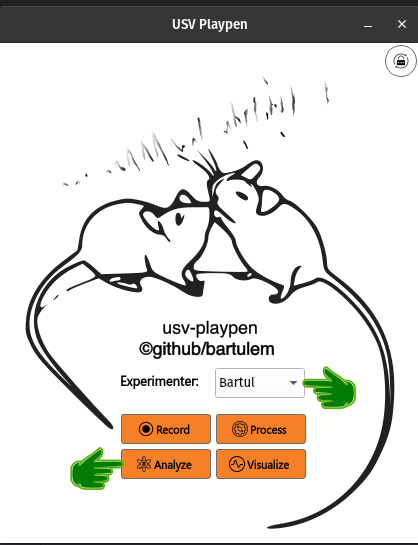
Clicking the Analyze button will open a new window with all the offered functionalities (see below):
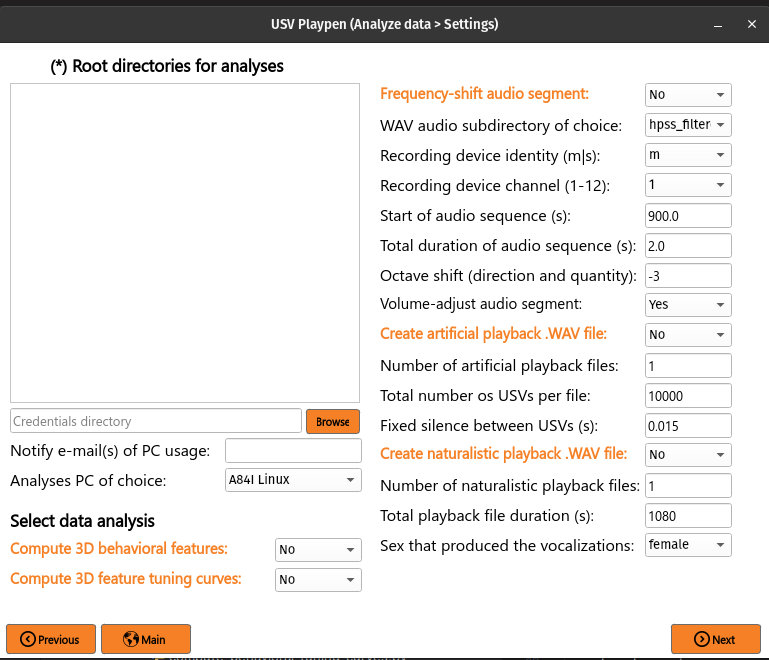
All the main functions are outlined in orange, and black fields are function-specific options tunable by the user in the GUI. It is important to note that these are not necessarily all the options the user can set, and the full list of options can be found under each function in the /usv-playpen/_parameter_settings/analyses_settings.json file. Each time the user clicks the Next button in the window above, analyses_settings.json is modified to the newest input configuration.
The Root directories field enables you to list the directories containing the data you want to analyze. Each root directory should be in its own row; for example, three sessions should be listed as follows:
/mnt/falkner/Bartul/20250430_145017
/mnt/falkner/Bartul/20250430_165730
/mnt/falkner/Bartul/20250430_182145
Compute 3D behavioral features
Once 3D tracking data is available, you can compute behavioral features. These can be individual features specific to each mouse (i.e., spatial location, speed, posture, etc.) or social features (assuming two or more mice) that describe the relationship between the mice (i.e., distance, angle, etc.). The output of this analysis are two files: [1] CSV file containing each measured feature in each column, and [2] a PDF file containing graphs for the observed distribution of each feature. To run this analysis in the GUI, you need to list the root directories of interest, select Compute 3D behavioral features, click Next and then Analyze:
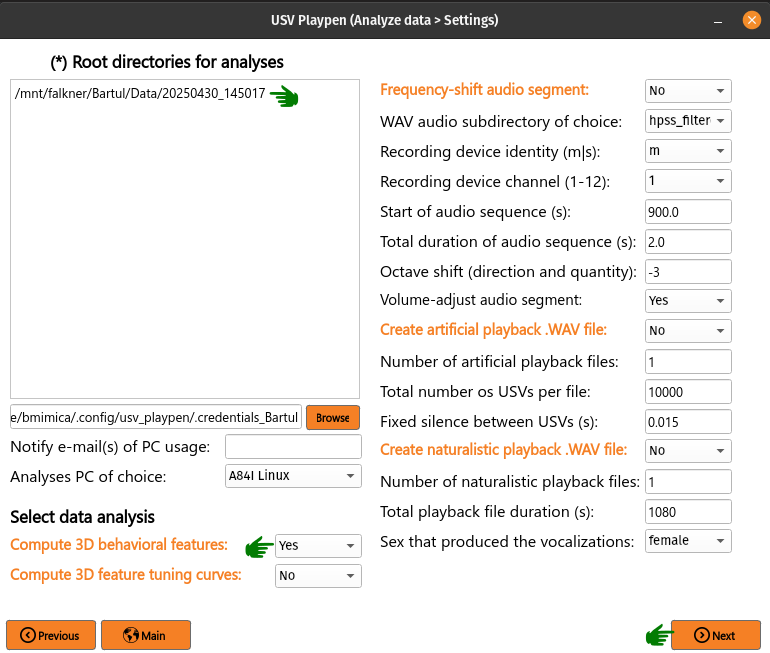
The analysis results in the creation of [1] a CSV file containing behavioral features, [2] a PDF file showing occupancy distributions for each feature, and both can be found as shown below:
├── 20250430_145017
│   ├── audio
│   │   ...
│   ├── ephys
│   │   ...
│   ├── sync
│   │   ...
│   │
│   └── video
│       ├── 20250430_145027.21241563
│       ...
│       ├── 20250430145035_camera_frame_count_dict.json
│       ├── 20250430145035
│       │    ├── 20250430145035_points3d_translated_rotated_metric_behavioral_features.csv
│       │    ├── 20250430145035_points3d_translated_rotated_metric_behavioral_features_histograms.pdf
│       ...
The behavioral_features.csv file should look similar to an example table below:
┌─────────────────┬─────────────────┬─────────────────┬────────────────┬───┬
│ 158114_2.spaceX ┆ 158114_2.spaceY ┆ 158114_2.spaceZ ┆ 158114_2.speed ┆ … ┆
│ ---             ┆ ---             ┆ ---             ┆ ---            ┆   ┆
│ f64             ┆ f64             ┆ f64             ┆ f64            ┆   ┆
╞═════════════════╪═════════════════╪═════════════════╪════════════════╪═══╪
│ -26.841561      ┆ -23.796571      ┆ 2.922045        ┆ NaN            ┆ … ┆
│ -26.844099      ┆ -23.798917      ┆ 2.923149        ┆ 0.426783       ┆ … ┆
│ -26.848196      ┆ -23.802833      ┆ 2.925208        ┆ 0.505712       ┆ … ┆
│ -26.85301       ┆ -23.807948      ┆ 2.927885        ┆ 0.598469       ┆ … ┆
│ -26.859138      ┆ -23.813435      ┆ 2.930909        ┆ 0.692332       ┆ … ┆
│ …               ┆ …               ┆ …               ┆ …              ┆ … ┆
│ -4.515579       ┆ -28.340828      ┆ 3.667301        ┆ 11.337689      ┆ … ┆
│ -4.583698       ┆ -28.336554      ┆ 3.668319        ┆ 9.594388       ┆ … ┆
│ -4.638644       ┆ -28.332085      ┆ 3.668867        ┆ 7.809649       ┆ … ┆
│ -4.678483       ┆ -28.327466      ┆ 3.668817        ┆ 6.153409       ┆ … ┆
│ -4.699602       ┆ -28.324635      ┆ 3.668698        ┆ 4.805457       ┆ … ┆
└─────────────────┴─────────────────┴─────────────────┴────────────────┴───┴
The /usv-playpen/_parameter_settings/analyses_settings.json file contains a section not modifiable in the GUI itself, but it can be modified manually:
head_points : head skeleton node names (order matters!)
tail_points : tail skeleton node names (order matters!)
back_root_points : back skeleton node names (order matters!)
derivative_bins : number of bins to compute derivatives over
speed_smoothing_time_window : Gaussian speed-smoothing window (in seconds); its stddev is
floor(window * capture_framerate)framesfeature_hist_num_bins : number of bins for the 1-D feature-distribution histograms
spatial_hist_min_val : lower edge (cm) of the 2-D spatial-occupancy histogram
spatial_hist_max_val : upper edge (cm) of the 2-D spatial-occupancy histogram
spatial_hist_num_bins : number of bins per axis for the 2-D spatial-occupancy histogram
  "compute_behavioral_features": {
      "head_points": [
        "Head",
        "Ear_R",
        "Ear_L",
        "Nose"
      ],
      "tail_points": [
        "TTI",
        "Tail_0",
        "Tail_1",
        "Tail_2",
        "TailTip"
      ],
      "back_root_points": [
        "Neck",
        "Trunk",
        "TTI"
      ],
      "derivative_bins": 10,
      "speed_smoothing_time_window": 0.015,
      "feature_hist_num_bins": 36,
      "spatial_hist_min_val": -32,
      "spatial_hist_max_val": 32,
      "spatial_hist_num_bins": 196
}
Compute neuronal tuning curves
Having recorded unit activity, social behavior, and ultrasonic vocalizations (USVs), you might be interested whether individual units encode specific behavioral features and / or vocal properties. To get at this, you can compute session-averaged tuning curves capturing the relationship between the firing rate of each unit and (a) each 3D behavioral feature, and (b) USV-anchored quantities — a pooled pre-USV PETH (peri-event time histogram; usv_peth), within-USV firing rate as a function of each continuous acoustic property (usv_property_tuning over duration, mean / peak frequency, bandwidth, amplitude, spectral entropy, mask number), within-USV firing rate as a function of categorical USV labels (usv_category_tuning over VAE (variational autoencoder) / QLVM (in-house quasi-Monte Carlo latent variable model) category and supercategory), and a per-category time-resolved peri-USV PETH (usv_category_peth). Behavioral and vocal payloads are produced together and serialized into a single per-cluster pickle. To trigger this in the GUI, list the root directories of interest, select Compute neuronal tuning curves, click Next and then Analyze (a progress bar will appear in the terminal while the analysis is running):
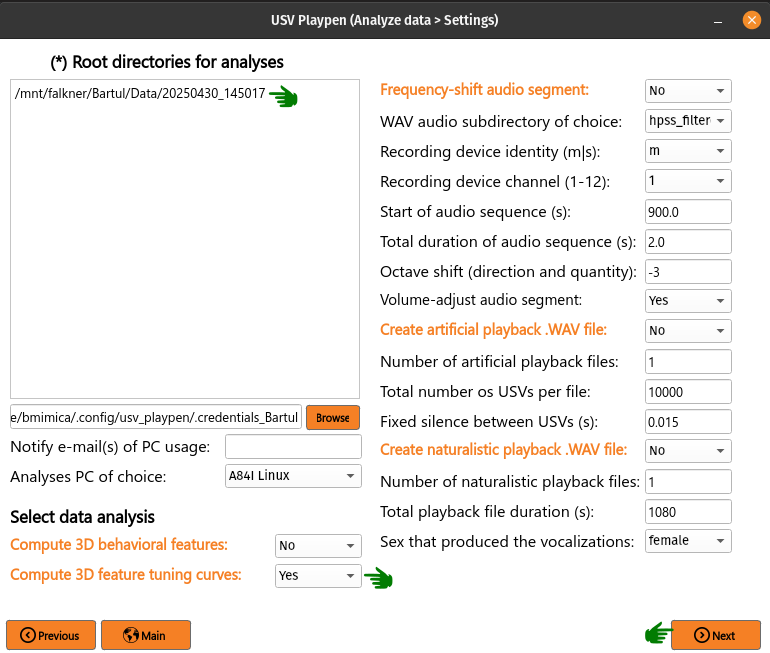
The analysis results in the creation of a tuning_curves subdirectory containing a pickle file for each recorded unit. Each pkl carries (when the corresponding inputs exist) beh_offset=*s blocks for behavioral tuning, plus usv_peth (PETH), usv_property_tuning (continuous property tuning), usv_category_tuning (categorical), usv_category_peth (per-category PETH), and behavioral_metadata / usv_metadata blocks describing the compute config:
├── 20250430_145017
│   ├── audio
│   │   ...
│   ├── ephys
│   │   ├── tuning_curves
│   │   │   ├── imec0_cl0000_ch361_good_tuning_curves_data.pkl
│   │   │   ...
│   ├── sync
│   │   ...
│   └── video
│       ...
The /usv-playpen/_parameter_settings/analyses_settings.json file contains a section only partially modifiable in the GUI, but it can be modified manually:
temporal_offsets : list of temporal offsets between spikes and behavior (in seconds, negative values: spikes follow behavior, i.e. behavior precedes spikes) for which the tuning curves will be calculated (adding values to the list increases the time needed for analysis drastically)
n_shuffles : number of spike train shuffles (increasing this number increases the time needed for analysis drastically)
shuffle_seed : base seed for the spike-train shuffle null distribution; fixing it makes the significance verdicts reproducible across runs
total_bin_num : total number of bins for a 1D behavioral / vocal-property feature
n_spatial_bins : number of spatial bins (2D behavioral feature)
spatial_scale_cm : maximum distance from center of arena to one edge (in cm)
shuffle_seconds_range :
[min, max]of the uniform circular shift (in s) used to build the null distributionpeth_window_seconds :
[start, stop]of the pre-USV PETH window (in s)peth_bin_seconds : PETH bin width (in s)
bout_quiet_seconds : inter-bout silence required to define a new bout (in s)
vocal_require_clean_post_anchor : if
true, the time after the USV onset must be free of contaminating USVs to keep the anchorvocal_require_clean_prior_anchor : if
true, the lookback window must also be free of contaminating USVsn_usv_min_self : minimum self-side USV count for the self plots to be computed
n_usv_min_partner : minimum partner-side USV count for the partner plots to be computed
n_usv_min_category : minimum per-category USV count to retain that category in the categorical tuning layouts
behavioral_min_occupancy_seconds : minimum behavioral occupancy per bin (in s) to draw that bin in 1D feature plots; persisted into
behavioral_metadatausv_property_min_occupancy_seconds : minimum vocal-property occupancy per bin (in s) to keep the rate estimate finite
include_partner_vocalization_tuning_bool : also compute partner-side vocal tuning when its threshold is met
smoothing_sd : standard deviation of the Gaussian kernel (in bins) applied to ratemaps and shuffle distributions;
0disables smoothingcircular_features : list of behavioral feature suffixes that are wrap-around in nature (e.g.
allo_yaw,body_dir); used by the triage helpers to detect divergence runs that span the bin-0 / bin-N boundary
"calculate_neuronal_tuning_curves": {
    "temporal_offsets": [0],
    "n_shuffles": 1000,
    "shuffle_seed": 0,
    "total_bin_num": 36,
    "n_spatial_bins": 196,
    "spatial_scale_cm": 32,
    "shuffle_seconds_range": [20, 60],
    "peth_window_seconds": [-2, 0],
    "peth_bin_seconds": 0.05,
    "bout_quiet_seconds": 2.0,
    "vocal_require_clean_post_anchor": true,
    "vocal_require_clean_prior_anchor": false,
    "n_usv_min_self": 30,
    "n_usv_min_partner": 30,
    "n_usv_min_category": 20,
    "behavioral_min_occupancy_seconds": 1.0,
    "usv_property_min_occupancy_seconds": 0.25,
    "include_partner_vocalization_tuning_bool": false,
    "smoothing_sd": 1.0,
    "circular_features": ["allo_yaw", "body_dir"]
}
Per-cluster triage_stats block
Each per-cluster pkl also carries a triage_stats block — a flat collection of pre-computed scalar summaries that the downstream unit-triage aggregator consumes without re-touching spike or USV data. It covers every modality the rate payload does — the 3D behavioral features (kinematic and social), 2D spatial location, and the USV-anchored quantities:
behavioral[offset_key][feature_key]— 1D tuning to every behavioral feature, kinematic (speed, posture, …) and social (distance, angle, …) alike. Per-direction (excitation / suppression) divergence-segment analysis:n_binstotal above (or below) the shuffle band,max_runconsecutive-bin run length,run_start_idx/run_end_idx(and the corresponding axis-value bounds),peak_idx/peak_z, pluspeak_abs_z,peak_signed_z,selectivity = (max−min)/(max+min),monotonicity(Spearman ρ between bin index and rate), andis_circular.spatial[offset_key][feature_key]— 2D place-cell diagnostics for location:info_rate_bps(Skaggs information rate),sparsity,coherence(Pearson correlation between each bin and the mean of its 8 neighbors), plus the unshuffled peak rate and its grid coordinates. The 2D spatial map is computed without shuffles, so peak Z is not defined; this block reports the rate / occupancy diagnostics instead.vmi[emitter]— Vocalization Modulation Index. For each emitter side:vmiin[-1, 1], paired Wilcoxon (the Wilcoxon signed-rank test)wilcoxon_statistic/wilcoxon_pvalueover the per-bout(FR_baseline, FR_USV)pairs, plusn_bouts,fr_baseline_per_boutandfr_usv_per_boutarrays.VMI = (FR_USV − FR_baseline) / (FR_USV + FR_baseline), whereFR_baselineis the mean firing rate in thebout_quiet_seconds-wide window before each bout andFR_USVis the mean over USVs in each bout of (spikes during USV) / (USV duration). Bouts whose baseline window starts beforet = 0are NaN-baselined.usv_property_tuning[emitter][prop]— the same per-direction divergence-segment (run) analysis as the 1D behavioral axes above (n_bins,max_run,run_start_idx/run_end_idx,peak_idx,peak_abs_z,peak_signed_z,selectivity,monotonicity, plusexcit/suppressrun segments).usv_peth[emitter]— a spike peri-event time histogram (PETH) around USV onset:peak_abs_z,peak_signed_z,peak_idx/peak_t,ramp_index(a two-point pre-USV shape descriptor), andexcit/suppressrun segments.usv_category_peth[emitter][cat_feat]— a per-category PETH:best_cat,best_abs_z,best_signed_z,best_t_idx/best_t,best_excit/best_suppress, andper_category.usv_category_tuning[emitter][cat_feat]— categorical (no run analysis):peak_abs_z,peak_signed_z,best_cat,n_sig_categories(count of categories outside the [p0.5, p99.5] shuffle band),selectivity.
Frequency shift audio segment
For presentation purposes, one might want to play audio data of mouse USVs. Since these are beyond human audible range, the only way is to frequency-shift them several octaves down. To achieve this in the GUI, you need to list the root directories of interest, select Frequency shift audio segment, choose the start time and duration of the segment, click Next and then Analyze:
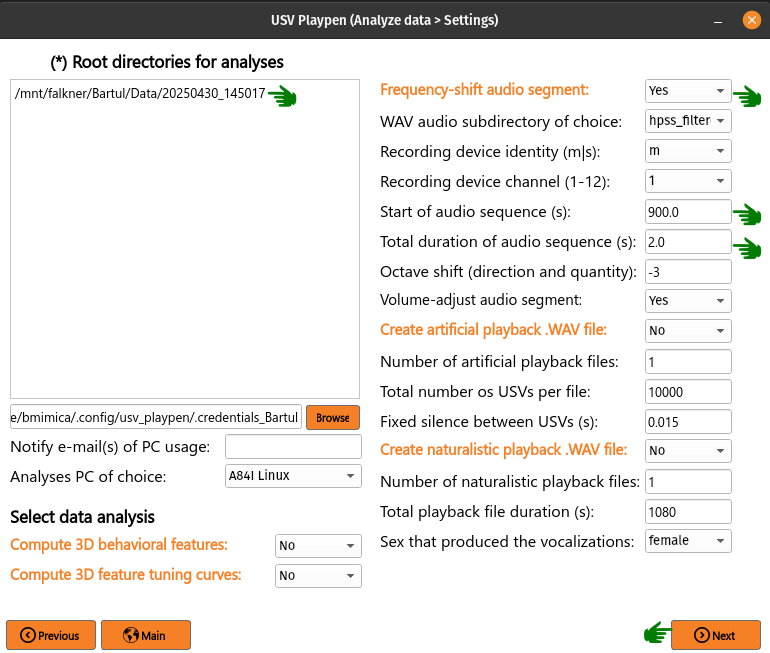
The analysis results in the creation of a frequency_shifted_audio_segments subdirectory (if it is not already there) and a wave file in it containing the frequency-shifted segment:
├── 20250430_145017
│   ├── audio
│   │   ├── frequency_shifted_audio_segments
│   │   │   ├── m_20250430145035_ch01_cropped_to_video_hpss_filtered.wav_start=900.0s_duration=2.0s_octave_shift=-3_audible_denoised_tempo_adjusted.wav
│   ├── ephys
│   │   ...
│   ├── sync
│   │   ...
│   └── video
│       ...
Below you can find an example of a brief sequence of frequency-shifted mouse vocalizations:
The /usv-playpen/_parameter_settings/analyses_settings.json file contains a section only partially modifiable in the GUI, but it can be modified manually:
fs_audio_dir : audio subdirectory where the audio files are stored
fs_device_id : USGH (Avisoft UltraSoundGate hardware) device ID (e.g. “m” for main, “s” for secondary)
fs_channel_id : microphone channel ID (1-12)
fs_wav_sampling_rate : sampling rate of the audio devices in kHz
fs_sequence_start : start time of the audio segment in seconds
fs_sequence_duration : duration of the audio segment in seconds
fs_octave_shift : octave shift of the audio segment (e.g. -3 shifts down three octaves, to 1/8 the original frequency)
fs_volume_adjustment : whether to automatically increase the volume of the audio segment; recommended since the vocalizations are faint
fs_compand_transfer : SoX
compandtransfer-function argument string applied during the volume-adjustment pass (attack/decay + dB transfer points)fs_noise_reduction_std_threshold :
noisereducestationary noise-reduction threshold (in noise standard deviations)fs_sinc_upper_cutoff_hz : upper cutoff (Hz) of the SoX
sinclow-pass, scaled by the octave shift, applied to non-filtered source audio
"frequency_shift_audio_segment": {
    "fs_audio_dir": "hpss_filtered",
    "fs_device_id": "m",
    "fs_channel_id": 1,
    "fs_wav_sampling_rate": 250,
    "fs_sequence_start": 900.0,
    "fs_sequence_duration": 2.0,
    "fs_octave_shift": -3,
    "fs_volume_adjustment": true,
    "fs_compand_transfer": "0.3,1 6:-70,-60,-20 -5 -90 0.2",
    "fs_noise_reduction_std_threshold": 3,
    "fs_sinc_upper_cutoff_hz": 25000
}
Create artificial playback .WAV
This function creates a .WAV file containing USV snippets. The snippets are randomly selected from the USV snippet repository in the specified directory and concatenated with inter-pulse intervals (IPIs) of a specified duration. The resulting .WAV file can be used for playback experiments. To achieve this in the GUI, select Create artificial playback .WAV file (no need to list root directories!), select total number of files to be created, number of vocalizations in each one, click Next and then Analyze:
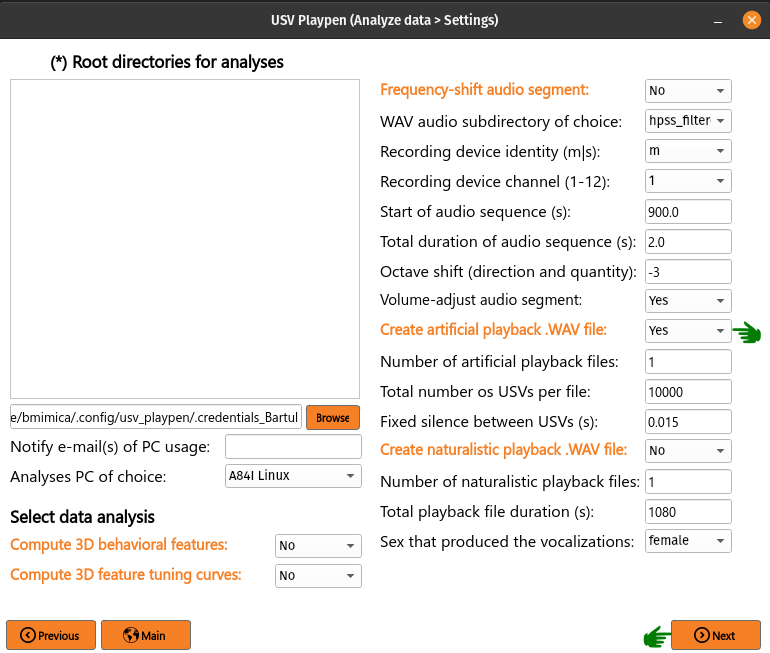
The analysis results in the creation of three files: [1] WAV file containing playback vocalizations, [2] a spacing text file informing you of the duration of each vocalization in order, and [3] a usvids text file containing the identity of each vocalization snippet if you need to go back and look at what it was:
/mnt/falkner/Bartul/usv_playback_experiments/usv_playback_files
├── usv_playback_n=10000_20250506_190808.wav
├── usv_playback_n=10000_20250506_190808_spacing.txt
├── usv_playback_n=10000_20250506_190808_usvids.txt
...
The /usv-playpen/_parameter_settings/analyses_settings.json file contains a section only partially modifiable in the GUI, but it can be modified manually:
num_usv_files : number of artificial playback files to be created
total_usv_number : total number of USVs to be included in one playback file
ipi_duration : inter-pulse interval duration in seconds
wav_sampling_rate : sampling rate of the playback .WAV file in kHz
playback_snippets_dir : subdirectory where the USV snippets are stored
playback_seed : optional RNG seed for reproducible snippet selection and assembly;
nulldraws a fresh random stimulus each run, an integer reproduces the same stimulus
"create_usv_playback_wav": {
    "num_usv_files": 1,
    "total_usv_number": 10000,
    "ipi_duration": 0.015,
    "wav_sampling_rate": 250,
    "playback_snippets_dir": "usv_playback_snippets_loudness_corrected",
    "playback_seed": null
}
Build the naturalistic USV repository
Naturalistic playback replays clean, real vocalizations, so the vocalizations must first be reconstructed and stored in a repository. build-naturalistic-usv-repository reads one or more session lists, segments each emitter’s USVs into their natural bouts, reconstructs every USV of every complete bout directly from its masked spectrogram (an inverse STFT of the SAM mask — it does not slice the raw recording, so detector noise is excluded), and writes the clean audio together with each bout’s membership, emission order, real within-bout and between-bout gaps, and every per-USV acoustic feature (including mask_number).
Each run builds exactly one (sex, social context) database, chosen by context_label. The session lists you supply are the only filter — the builder does not gate on experiment code, so you control coverage purely by which sessions you list. The output is written to:
<naturalistic_usv_repository_dir>/<sex>/naturalistic_usv_repository_<context>_<datestring>.h5
where naturalistic_usv_repository_dir is configured once under the shared data_roots block, <sex> is male / female / mixed, and <context> is the filename token (courtship / same_sex / lone / mixed). The datestring suffix means rebuilding a context never overwrites an earlier build, and each H5 also records the exact session lists it was built from (provenance). To run it from the command line, see Command Line Interfaces (CLI).
The /usv-playpen/_parameter_settings/analyses_settings.json build_naturalistic_usv_repository section:
session_lists : one or more text files (one session root directory per line) whose sessions this build draws from; this list is the sole selection of what enters the repository
context_label : which (sex, social context) database to build — one of
courtship_male,courtship_female,lone_male,lone_female,same_sex_male,same_sex_female,mixed. It sets three things at once: (1) emitter handling — acourtship_*build keeps only the target sex’s attributed track (the two animals differ in sex), whilesame_sex_*/lone_*keep every USV labelled by that sex (no per-USV attribution needed), andmixedkeeps every USV with no sex split; (2) the output subdirectory (male/female/mixed); and (3) the filename context tokenibi_z_score : how many standard deviations above the mean (in log inter-USV-interval space) a silent gap must be to count as a bout boundary — the split threshold is
exp(μ + z·σ)(2.58≈ the 99.5th percentile of the one-sided cutoff), with the per-sexμandσtaken from the modeling mixture modelibi_component_index : which component of the per-sex log-inter-USV-interval mixture supplies that
μandσ(0= the first / fastest component)min_vocalizations : the fewest USVs a bout must contain to be kept (single-call bouts are dropped)
length_threshold : the maximum USV duration in spectrogram time-bins — a bout is discarded if any of its USVs is longer than this, since the stored mask is only 128 columns wide and would otherwise truncate the call
min_duration : the minimum USV duration in time-bins — a bout is discarded if any of its USVs is shorter
mask_dilation : grow the SAM mask by this many bins before inversion;
0keeps the mask tight (dilation pulls in neighbouring energy and muddies the reconstruction)feather_sigma_time : Gaussian sigma (in time-bins) of the time-only mask feather that softens each call’s onset/offset to remove edge clicks (feathering is applied in time only — a frequency feather bleeds a halo above and below the call)
fade_ms : length (ms) of the raised-cosine onset/offset fade applied to each reconstructed USV (call-adaptive), removing any residual edge click
peak_normalize : if
true, peak-normalize every USV to a uniform level; iffalse, preserve the calls’ relative amplitudespeak_target_fraction : the fraction of the int16 ceiling each peak-normalized snippet is scaled to (
0.85leaves headroom below clipping)
The repository root itself lives under the shared data_roots block:
naturalistic_usv_repository_dir : the root directory holding the
male/female/mixedsubdirectories that the builds are written into and the playback step reads from
"build_naturalistic_usv_repository": {
    "session_lists": [
        "/mnt/falkner/Bartul/modeling/input_files/behavioral_courtship_intact_partners_sessions_list.txt"
    ],
    "context_label": "courtship_female",
    "ibi_z_score": 2.58,
    "ibi_component_index": 0,
    "min_vocalizations": 2,
    "length_threshold": 128,
    "min_duration": 1,
    "mask_dilation": 0,
    "feather_sigma_time": 0.8,
    "fade_ms": 4.0,
    "peak_normalize": true,
    "peak_target_fraction": 0.85
}
Create naturalistic playback .WAV
This function creates a .WAV file that replays real vocalization bouts drawn from a naturalistic USV repository (built by build-naturalistic-usv-repository, above). Instead of stitching randomly-chosen single snippets, it replays whole recorded bouts in their natural emission order (1-2-3-4-5-6) with their real timing, so the playback reproduces natural USV sequences. The resulting .WAV file can be used for playback experiments.
To achieve this in the GUI, select Create naturalistic playback .WAV file (no need to list root directories!), set the parameters described below — the vocalization context (a dropdown listing only the contexts that have actually been built), the playback duration and number of files, the optional complexity steering (a Yes/No dropdown plus threshold / start / end / bandwidth sliders that grey out when it is off), and the playback seed — then click Next and Analyze:
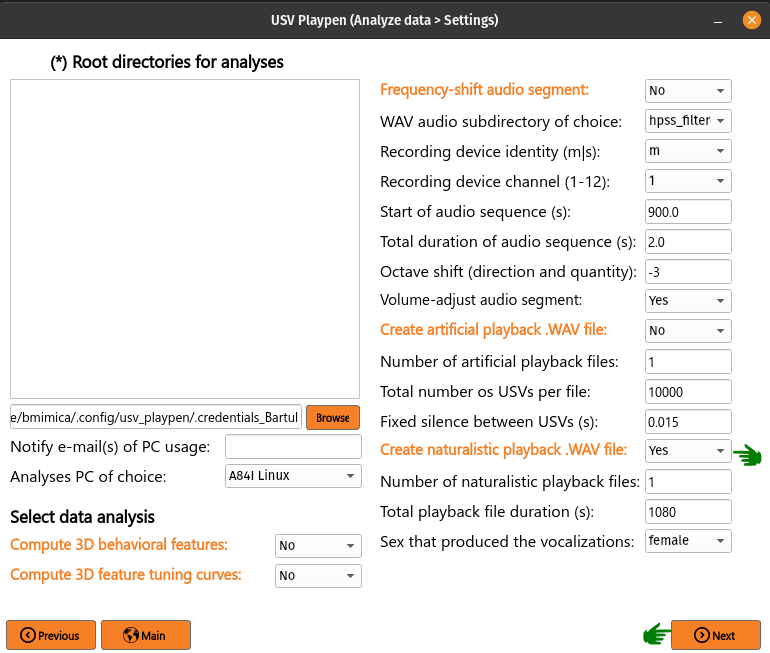
From context_label the generator opens the newest matching repository H5 under <naturalistic_usv_repository_dir>/<sex>/, which holds the clean reconstructed audio plus the natural bout structure (which USVs belong to each bout, their order, and the real within-bout and between-bout gaps). It writes a fixed edge_silence_seconds lead-in silence, then repeats:
draw a random intact bout and append its USVs in their natural emission order, separated by their real within-bout inter-USV intervals (IUI) of silence
between bouts (not before the first), insert the drawn bout’s real preceding inter-sequence interval (ISI) of silence — a session-first bout (no recorded pause) uses a sampled real ISI — clipped to
max_isi_secondsso no single pause is huge
It keeps adding whole bouts, skipping any that (with the lead-out) would overrun the target, until the remaining time is too small; it then writes a fixed edge_silence_seconds lead-out silence. The within-bout and between-bout gaps are genuine recorded values (no interval model). Because the file is built of whole bouts framed by the fixed edge silences, it is up to total_acceptable_naturalistic_playback_time seconds — opening and closing on the edge silence and ending on a complete bout — rather than exactly that length.
The three files are written into the naturalistic_usv_playback_dir directory configured under the shared data_roots block. The analysis creates: [1] the WAV file, [2] a spacing text file with the sample count of each chunk in order, and [3] a usvids text file with the identity of each chunk — <session>_usv<row> for a vocalization (so you can trace it back to the source session and USV), or ISI / IUI for a silence gap:
/mnt/falkner/Bartul/usv_playback_experiments/usv_naturalistic_playback_files
├── female_usv_playback_1080s_20250506_190808.wav
├── female_usv_playback_1080s_20250506_190808_spacing.txt
├── female_usv_playback_1080s_20250506_190808_usvids.txt
...
Every setting below is exposed in the GUI’s Create naturalistic playback .WAV block: context_label is a dropdown (populated only with contexts that have a built repository); total_acceptable_naturalistic_playback_time, num_naturalistic_usv_files and playback_seed are text fields; complexity_enabled is a Yes/No dropdown; and complexity_mask_threshold, complexity_start_fraction, complexity_end_fraction and complexity_bandwidth are sliders that grey out while complexity is disabled. The same values can equally be edited directly in analyses_settings.json:
num_naturalistic_usv_files : number of naturalistic playback files to create in one run (with a fixed
playback_seedthe files differ from one another but the whole set is reproducible)context_label : which repository to play back — one of
courtship_male,courtship_female,lone_male,lone_female,same_sex_male,same_sex_female,mixed. It selects the sex subdirectory and context token, and the playback always opens the newest matching build in that directory (no explicit file path); the chosen sex also prefixes the output filenamestotal_acceptable_naturalistic_playback_time : the target duration of the playback file (in s); since the file is assembled from whole bouts framed by the fixed edge silences, the result is up to this length (a little under), ending on a complete bout
complexity_enabled : master switch for complexity steering. If
false(default) bouts are drawn uniformly at random (the natural mix) and the remainingcomplexity_*settings are inert; iftruethe draws are biased by call complexitycomplexity_mask_threshold : with steering on, a USV is complex if its
mask_number(count of SAM masks) is>=this value (2= multi-component), else simplecomplexity_start_fraction / complexity_end_fraction : the target fraction of complex USVs at the start and end of the file (0–1), interpolated linearly across the file position. Equal values hold a constant simple:complex ratio (e.g.
1.0 / 1.0= all-complex throughout); unequal values are a ramp —0.0 → 1.0starts simple and grows more complex. Because bouts are drawn with replacement, a target is met by repeating complex-heavy bouts as needed (whole bouts, natural order preserved), bounded by what the available bouts contain; the achieved ratio and number of distinct bouts used are loggedcomplexity_bandwidth : the width (standard deviation, in complex-fraction units) of the Gaussian that weights each bout by how far its own complex-fraction sits from the current target. Smaller (e.g.
0.05) steers tightly to the target but from a narrow pool of bouts (more repetition); larger (e.g.0.5) keeps more variety but tracks the target more loosely. The default0.15is a moderate middleedge_silence_seconds : fixed silence written at the very start and very end of the file (s), so it opens and closes on a short, constant gap rather than a variable (or truncated) real pause. Default
1.0max_isi_seconds : each inserted inter-bout pause (ISI) is clipped to at most this many seconds, so a single unusually long recorded gap cannot drop a giant silence into the file. Default
12.6(a typical courtship inter-bout gap)playback_seed : RNG seed for the bout draws;
nulldraws a fresh random stimulus every run (non-reproducible), an integer reproduces the exact same file(s)
"create_naturalistic_usv_playback_wav": {
    "num_naturalistic_usv_files": 1,
    "context_label": "courtship_male",
    "total_acceptable_naturalistic_playback_time": 60,
    "complexity_enabled": false,
    "complexity_mask_threshold": 2,
    "complexity_start_fraction": 0.0,
    "complexity_end_fraction": 1.0,
    "complexity_bandwidth": 0.15,
    "edge_silence_seconds": 1.0,
    "max_isi_seconds": 12.6,
    "playback_seed": null
}
Note
The generated .wav is written at the repository’s native 250 kHz sampling rate.
The playback audio device expects 192 kHz, so change the audio’s sampling rate from
250 kHz to 192 kHz before playback (resample the file to 192 kHz, or set the output rate
on the playback command).